
If you’re evaluating DNS blocklist feeds, you already know what they do. This post skips the explainer and gets to the part that actually matters: how to tell whether the feed you’re running—or considering—is actually any good. Most teams set up a DNS blocklist once and never stress-test it again. The feed blocks something, nothing catches fire, and it stays in place for years. That’s not validation. That’s survivorship bias.
Here’s how to evaluate what you’re actually getting.
The Four Variables That Separate Good Feeds from Costly Ones
Strip away the vendor marketing and every DNS blocklist feed can be evaluated on four variables:
Update frequency. How old is the data by the time it hits your resolver? This is the most important variable and the one least often disclosed with precision.
Coverage breadth. How many domains, across what threat categories? A feed that’s comprehensive for phishing but blind to newly registered malware distribution domains isn’t comprehensive—it’s selective.
Signal quality. Does the feed give you a confidence score or risk rating, or is everything binary block/allow? Binary feeds force you to choose between over-blocking (and the helpdesk tickets that follow) and under-blocking (and the incidents that follow).
Provenance transparency. Can you understand why a domain is on the list? Black-box blocklists make false positive investigations a nightmare and give you nothing to show an auditor or an end user asking why their SaaS tool is blocked.
Most free community feeds fail on at least two of these. Many commercial feeds claim to pass all four but publish nothing to back it up. Ask for specifics before you trust anything.
Update Frequency: The Math Your Vendor Doesn’t Show You
Phishing and malware distribution infrastructure burns fast. Threat actors register a domain, stand up a page, run a campaign for a few hours or a day, then rotate. The attack window—when targets are actually being hit—often closes before most blocklist feeds have even seen the domain.
Run the numbers yourself. If a phishing domain goes live at 9am and a user clicks a link at 11am, a feed that last synced at midnight—even a daily-updated commercial feed—had no chance of blocking it. Hourly updates don’t close the gap entirely, but they reduce it by an order of magnitude. The difference between “updated daily” and “updated hourly” is the difference between a 23-hour blind spot and a 59-minute one.
When you’re evaluating a feed, don’t accept “regularly updated” or “near real-time” as answers. Ask for the exact update interval and—if you can get it—the average time-to-block lag from domain registration to feed inclusion. If a vendor can’t give you those numbers, that tells you something.
How to Benchmark a Feed You’re Already Running
The fastest way to evaluate your current DNS blocklist is to test it against ground truth you already have.
Test against known-malicious domains from your own incident history. Pull a list of domains from past alerts or incidents. Run them through your current feed and check whether they were on the list—and if so, when they were added relative to the incident. If you’re seeing consistent lag, you have evidence to act on.
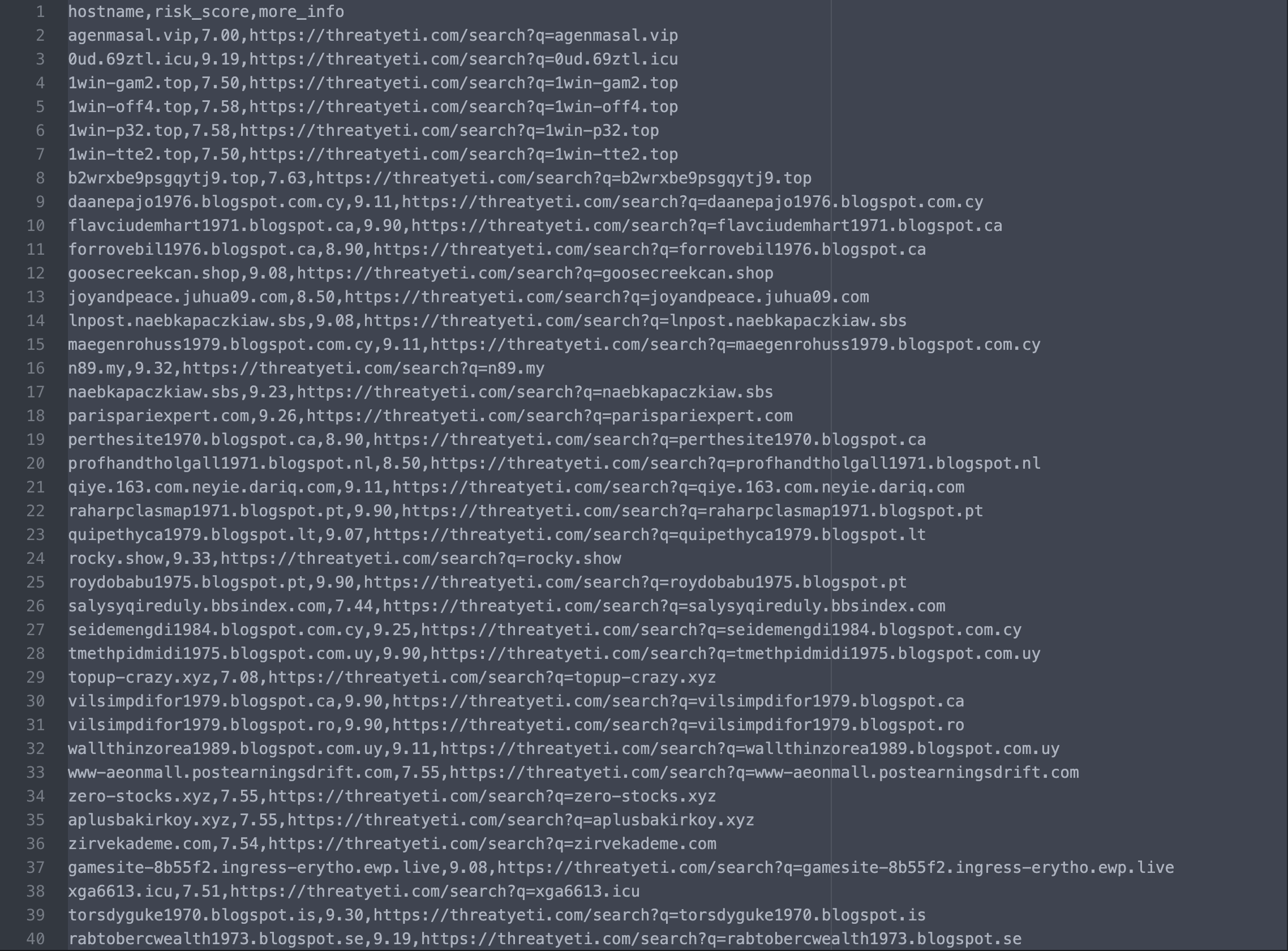
Use a secondary source as a benchmark. The alphaMountain Community 1000 list is a free daily sample of 1,000 randomly drawn malicious domains from alphaMountain’s classified dataset—updated every day, no account required. Feed it into your resolver and see what your current blocklist would have caught. The delta is your coverage gap. Get the free feed here.
Run a false positive check. Take a list of known-legitimate high-traffic domains—major SaaS tools, CDN hostnames, cloud provider endpoints—and test whether your feed blocks any of them. Even a handful of false positives on widely-used domains is a signal that the feed’s classification methodology has quality control issues.
None of this takes more than a few hours to set up. If you’ve never done it, you should.
Community Feeds vs. Commercial Feeds: What the Trade-offs Actually Look Like
Free community feeds—abuse.ch URLHAUS, Spamhaus DBL, and others—are legitimate and worth running. They’re maintained by researchers who know the threat landscape, and for specific threat categories they’re accurate and timely. But they’re lists, not intelligence. There’s no risk rating, no category context, no way to tune policy by confidence level. You block what’s on the list and allow everything else.
| abuse.ch URLHAUS | Spamhaus DBL | aM Community 1000 | alphaMountain API | |
|---|---|---|---|---|
| Update frequency | Real-time | Real-time | Daily | Hourly (w/ Real-time fallback) |
| Risk / confidence scoring | No | No (zone codes only) | Yes | Yes — 1.00–10.00 decimal scale |
| Classification categories | 1 (malware URLs) | ~5 threat zones | None | 92 categories |
| Threat type coverage | Malware distribution only | Spam, phishing, malware, botnet, abused domains | Broad malicious sample | Malware, phishing, scam, spam, adware, P2P, adult content, and 85+ more |
| Programmatic API access | Yes (free REST API) | DNS-based query | No (download only) | Yes |
| AI-powered classification | No | No | Yes (sampled from AI-classified dataset) | Yes (continuously trained) |
| Policy threshold tuning | No | No | No | Yes (category and/or risk score) |
| Cost | Free | Free (volume limits apply) | Free | Paid (free trial available) |
Commercial feeds give you broader coverage and faster updates, but “commercial” doesn’t automatically mean better. The question is whether the feed is powered by a continuously-trained model or by static rules and human review. Static rule sets scale poorly. They catch threats that look like threats they’ve seen before. Anything novel—a new DGA pattern, a fast-flux campaign using fresh infrastructure, a typosquatting domain that’s only a few hours old—can fly through until a human adds it.
A continuously-trained AI engine catches those patterns before they match a known signature. That’s the structural difference that matters when you’re comparing feeds at the same price point. alphaMountain’s threat intelligence feed API runs on a continuously-trained model, returns a domain or IP reputation score on a 1.00–10.00 scale, covers 92 classification categories, and updates hourly. That combination—risk scoring plus category context plus hourly freshness—is what makes it usable as policy infrastructure rather than a flat block list. See the API and start a free trial.
Red Flags When Evaluating a DNS Blocklist Vendor
A few things that should make you push back or walk away:
They can’t give you a precise update interval. “Continuously updated” and “near real-time” are not answers. If they won’t commit to a number, the number is probably not good.
The feed is binary. Block or allow, nothing in between. If you can’t set risk thresholds—block everything above 8.0, flag for review between 6.0 and 8.0, allow below 6.0—you’re flying blind on policy tuning.
No false positive transparency. Every feed has false positives. A vendor who claims otherwise is either lying or hasn’t looked. The question is whether they track it, report on it, and give you a way to report and resolve FPs quickly.
The category system hasn’t changed in years. Threat categories evolve. A feed still using the same taxonomy it had five years ago hasn’t been keeping up with the threat landscape.
No API access. Feed-only delivery means you can’t programmatically set thresholds, query individual domains on demand, or integrate enrichment into your detection and response workflow. That’s a significant operational limitation if you’re building anything more sophisticated than a basic DNS filter.
Start with Free, Scale with the API
If you want to benchmark your current DNS blocklist feed—or just add a daily pulse of fresh malicious domains to your defenses—the alphaMountain Community 1000 list is free, updated daily, and requires no account. Download it here and run it against what you already have.
If you’re building a DNS filter, next-gen firewall, email security gateway, or security automation platform and need hourly-updated threat intelligence with risk ratings and 92 classification categories, start a free API trial. The same data that powers the Community 1000 list, available programmatically at the scale and freshness your product actually needs.