
For years, security vendors made a quiet assumption: when a device on your network opens a TLS connection, the Server Name Indication (SNI) field in the ClientHello will tell you exactly where it’s going. That hostname became the foundation of every DNS filter, every next-gen firewall policy, every URL classification decision that happens at the network edge.
That assumption just got a lot less reliable.
TLS 1.3 began quietly eroding SNI visibility when it removed the cleartext handshake fields that inspection tools depended on. Now Cloudflare — which handles roughly 20% of all web traffic — is rolling out Encrypted Client Hello (ECH) at scale. ECH encrypts the entire ClientHello, including the SNI field. The hostname your tools were reading to classify traffic? Gone.
This isn’t a future problem. It’s arriving now.
What SNI Was Doing For You (And What Happens Without It)
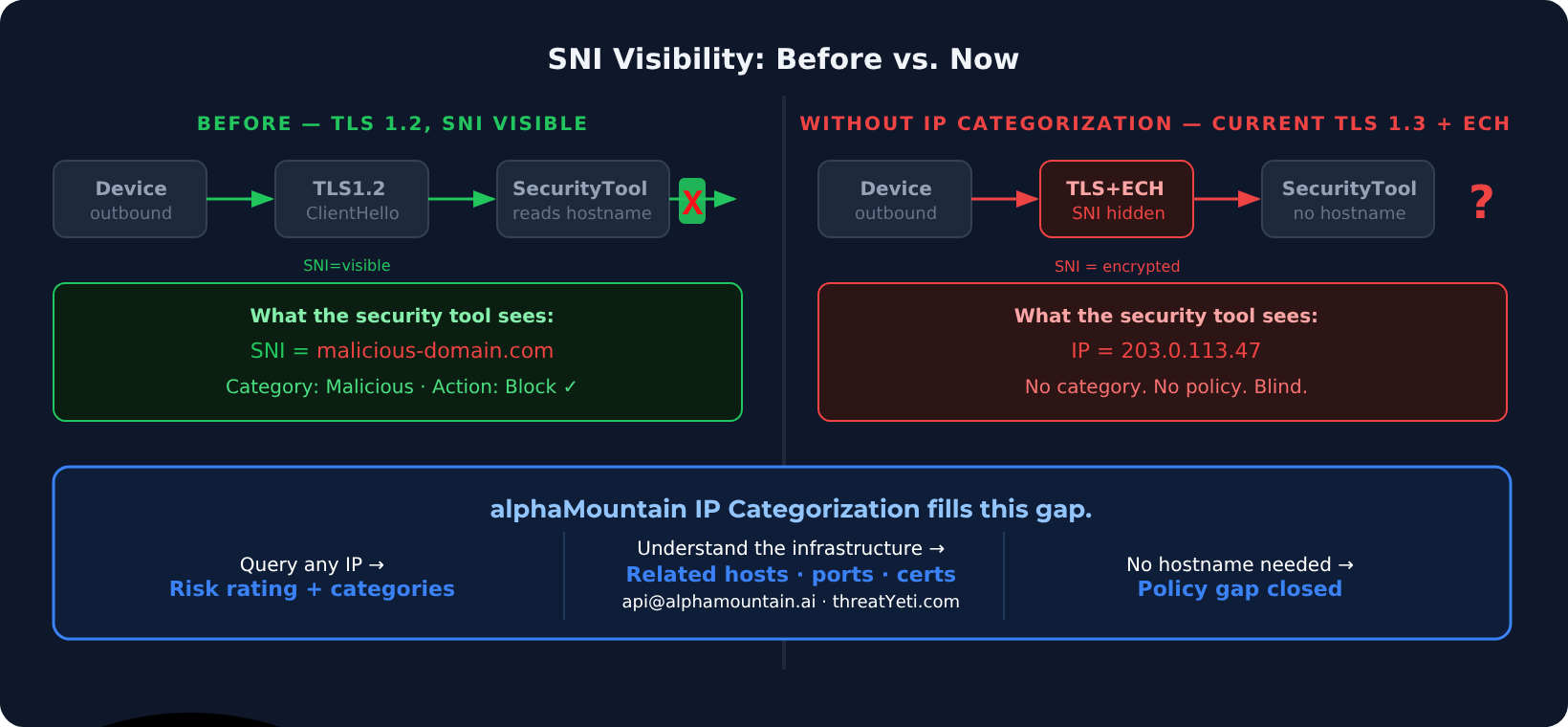
Network security products use SNI for one critical job: mapping an outbound connection to a hostname so that hostname can be classified, rated, allowed, or blocked.
Your DNS filter sees a query for malicious-phishing-domain.com and blocks it. Your NGFW sees an outbound TLS connection to malicious-phishing-domain.com via SNI and blocks it. Your SIEM enriches an alert with the hostname from the connection log. The whole pipeline assumes you can see the hostname.
ECH breaks every step of that pipeline for traffic passing through an ECH-capable endpoint — which, increasingly, means Cloudflare-proxied traffic.
But here’s what makes this particularly uncomfortable: SNI visibility was never complete to begin with.
A significant portion of network traffic never had a hostname attached. Direct IP connections. Malware that skips DNS entirely. Traffic to hosting infrastructure where the IP resolves to no meaningful domain. Attackers learned years ago that connecting directly to an IP address is a reliable way to evade hostname-based controls. With ECH accelerating, that evasion technique is becoming the norm for legitimate traffic too.
The question security teams now face isn’t just “what do we do when ECH hides the SNI?” It’s the harder version: what do you do when you only have an IP?
The IP Visibility Gap
When you strip away the hostname — whether because of ECH, TLS 1.3 SNI encryption, direct IP traffic, or malware that resolves DNS out-of-band — you’re left with a source IP, a destination IP, a port, and a protocol. That’s it.
For most security tools, that’s a dead end. IP-based blocking exists, of course, but it’s blunt: block the entire IP and you’re likely collateral-damaging legitimate traffic on shared hosting. Allow everything you can’t classify and you’re green-lighting threats you simply can’t see.
What’s been missing is the ability to categorize an IP — not just rate its reputation, but understand what it is, what services run on it, what kind of traffic it handles, and how risky it is to allow a connection to reach it. That’s a fundamentally different capability than a blocklist lookup.
IP Categorization: What We Built
We’ve added IP categorization to our threat intelligence API — and as far as we know, it’s the first capability of its kind in the industry.
When you query an IP through our API, you don’t just get a reputation score. You get a full contextual picture: what categories of content or threat are associated with that IP, what other infrastructure shares it, what ports are open, what TLS certificates are present, and what risk rating the IP carries on our 1.00–10.00 scale.
For a security product losing hostname context to ECH, this matters. Instead of seeing an outbound connection to an unfamiliar IP and having no policy to apply, you can query it, get its category, and make a real decision. A connection to legitimate CDN infrastructure with a low risk rating gets through. A connection to an IP rated 8.4 — categories including Malicious and Botnet infrastructure, 2,000+ co-located risky hosts, ports consistent with C2 — gets blocked.
That’s classification at the IP layer. The “I only have an IP” problem now has an answer.
What This Means for Security Products Built on SNI
If you’re building or operating a DNS filter, NGFW, secure web gateway, or any product that classifies traffic based on hostname: the ECH trajectory is a forcing function. The question isn’t whether to add IP-layer visibility — it’s whether you’ll have it before your customers start asking why your product can’t classify an increasing share of traffic.
The practical path is to add IP categorization as a parallel enrichment layer alongside existing hostname-based classification. When you have an FQDN, use it. When you don’t — because ECH encrypted it, because the connection is direct-to-IP, because DNS was bypassed entirely — fall back to IP categorization. The policy gap closes.
Our IP categorization is available through the same unified API that powers our URL classification, domain reputation, and full aM Intelligence™ enrichment. One integration, no new pipeline to build.
What You’re Working With vs. What You Could Have
| Traditional IP Tools | alphaMountain | |
|---|---|---|
| Detects known-bad IPs | ✓ (if listed) | ✓ |
| Works without hostname or SNI | Imprecise | ✓ |
| IP reputation score | Varies | ✓ (1.00–10.00 scale) |
| Threat/content category | ✗ | ✓ (92 categories) |
| Co-hosted infrastructure visibility | ✗ | ✓ |
| Open ports & certificate data | ✗ | ✓ |
| Update frequency | Daily or slower | Hourly |
| Confident policy decision without FQDN | ✗ | ✓ |
Try It
IP categorization is live in our API now. If you’re evaluating how to address ECH-driven visibility loss in your product, or building threat intel enrichment that needs to work with raw IP traffic, request a free API trial here.
You can also investigate any IP directly in threatYeti — our free threat hunting platform. Enter an IP and see the full intelligence picture: risk rating, categories, related infrastructure, open ports, certificate data, and more.
The hostname isn’t always available anymore. The IP always is.